The “Booking Bot” System (Healthcare CRM Software)

A new kind of CRM, The “Booking Bot” System, that finally puts your front desk, clinicians, billing, and marketing teams on the same page, across every step from first inquiry to booked appointment and beyond. Built as healthcare CRM software and set up for you, it's the best CRM for small business practices that are tired of losing patients to missed calls, sticky notes, and scattered spreadsheets.

Missed call text back built in
Teamspaces for every department
Privacy-first configuration
★★★★★
4.8/5
150+
Practices Served
USA · UK · CA · AU
Markets Served

Get Your Free CRM Walkthrough

Tell us your specialty and where you operate. We'll show you where inquiries are slipping through the cracks today.

Every unanswered call is a patient who tried to book and couldn't. Rankingeek CRM makes sure the next one hears back in seconds.

The Problem

Patient Inquiry Challenges Our CRM Solves

Most practices don't lose patients because of their care. They lose them between the first phone call and the booked appointment. As healthcare CRM software designed around how clinics actually work, Rankingeek CRM (The “Booking Bot” System) closes those gaps.

Missed Calls Become Missed Patients

Missed Calls Become Missed Patients

The front desk is with a patient, the phone rings out, and the caller simply tries the next clinic on the list. Most never leave a voicemail, so you never know they called.

✓
Missed call text-back software replies by SMS within seconds and invites the caller to book.
Patient Inquiries Scattered Everywhere

Patient Inquiries Scattered Everywhere

Web forms land in one inbox, social messages in another, call notes on paper, and follow-ups in someone's head. When a team member is away, the inquiry disappears with them.

✓
Every inquiry flows into one searchable record that the whole team can see.
Slow Follow-Up on New Leads

Slow Follow-Up on New Leads

A patient fills in a consultation form on Friday evening and hears back on Tuesday. By then they've booked elsewhere, and your ad spend paid for someone else's patient.

✓
Automated first replies and task reminders make sure no new inquiry waits for a human to notice it.
No-Shows & Manual Reminders

No-Shows & Manual Reminders

Staff spend hours each week phoning patients to confirm appointments, and gaps still appear in the schedule when people forget or can't get through to reschedule.

✓
Automated, consent-based reminders let patients confirm or reschedule in a single reply.
No Line of Sight on Marketing ROI

No Line of Sight on Marketing ROI

You know how much you spend on ads and SEO, but not which campaigns produced booked patients. Decisions end up based on gut feel rather than evidence.

✓
Source tracking connects each inquiry to the campaign that produced it, through to booking.
Privacy Risk From Consumer Tools

Privacy Risk From Consumer Tools

Patient details shared over personal phones, open spreadsheets, and free messaging apps are hard to control and harder to audit if something goes wrong.

✓
Role-based access, minimum-necessary data, and market-specific privacy settings are configured from day one.
How We Work

How Does Rankingeek CRM for Everyone Work?

We don't hand you a login and wish you luck. Our team sets up, connects, and tunes your CRM around the way your practice already runs, then helps every team adopt it with confidence.

01

Map Your Patient Journey

We start with a working session to understand how inquiries reach you today, by phone, web form, social message, or referral, and what happens next. Together, we agree on the stages a new patient moves through and where things currently get lost.
02

Create a Teamspace for Every Team

Teamspaces bring each group into the CRM with its own organized workspace: front desk, treatment coordinators, billing, marketing, and management. Each space is run by its own team lead, while your CRM administrator keeps full control over access, settings, and data.
03

Migrate & Centralize Your Data

We import your existing patient inquiry lists, contacts, and open follow-ups from spreadsheets or your current system, clean up duplicates, and bring everything into one secure record. Clinical notes stay in your practice management or EHR system, where they belong.
04

Connect Calls, Forms & Messages

We connect your phone line, website forms, booking links, and messaging channels so every inquiry is captured automatically. This is also where we switch on missed call text back, so an unanswered call becomes an instant, friendly SMS.
05

Automate the Follow-Up

We build workflows that send first replies, assign tasks, remind staff to call back, and send appointment reminders to patients who have agreed to receive them. Routine admin moves to the CRM, so your team can focus on the patient in front of them.
06

Train, Report & Refine

Every team gets hands-on training for its own Teamspace. Once live, we review dashboards with you, spot where inquiries still stall, and refine pipelines and automations each month as your practice grows.
Deliverables

What You'll Get With Rankingeek CRM

Better organization, higher productivity, stronger team collaboration, and more personal patient service. Here's exactly what we set up and hand over so you get those benefits of a CRM system from the first month.

Patient Contact Management

Patient Contact Management

Names, phone numbers, email addresses, inquiry history, and communication records stored in one place, so anyone can pick up a conversation where it left off.
Single Source of Truth

Single Source of Truth

Data from front desk, marketing and patient support united in one system, instead of copies in five spreadsheets that never quite agree.
Patient Pipeline Tracking

Patient Pipeline Tracking

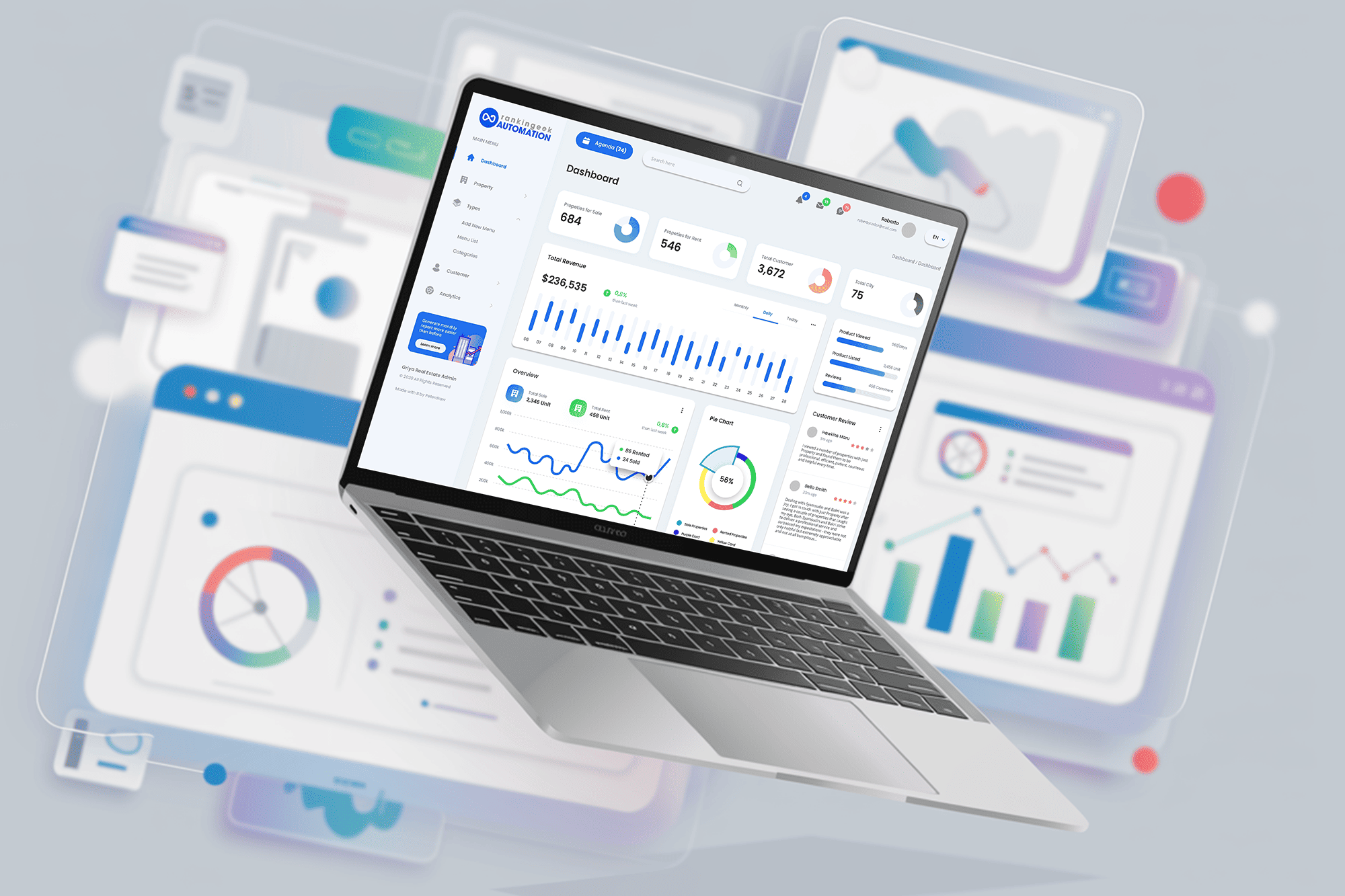
A visual board showing every active inquiry and where it stands, from new lead to consultation booked to treatment accepted.
Workflow Automation

Workflow Automation

Follow-up messages, staff tasks, and reminders triggered automatically, so nothing depends on someone remembering to do it.
Missed Call Text Back

Missed Call Text Back

An instant SMS to anyone whose call goes unanswered, with a link to book or a prompt to reply, set up with compliant wording for your market.
Analytics & Dashboards

Analytics & Dashboards

Real-time reports on inquiries, bookings, response times, and revenue by source, so you can see which marketing is really working.
Teamspaces & Role-Based Access

Teamspaces & Role-Based Access

A dedicated workspace for each department, with permissions that show every team member only what they need to see.
Setup, Migration & Training

Setup, Migration & Training

Full configuration, data import, channel connections, and team training, plus monthly check-ins to keep the system working as you grow.

You own all of it. Your website, your Google Business Profile, your analytics, your data — always in your name, always exportable.

The Case For a CRM

Why a CRM Matters for Your Healthcare Practice

A Customer Relationship Management (CRM) system matters because it centralizes patient inquiry data, streamlines every interaction, and automates the daily tasks that slow down your front desk, marketing, and support teams. For a small practice, that can be the difference between a full appointment book and a phone that rings out while the team is busy.

The benefits of a CRM system are sharper in healthcare than almost anywhere else. Patients expect quick answers, often contact several clinics at once, and judge the whole practice by how the first call is handled. A CRM for healthcare industry use also has to respect patient privacy rules, which is why generic sales software and spreadsheets rarely fit. Rankingeek CRM brings speed and organization to patient communication without asking your team to cut corners.

The benefits of a CRM system at a glance

  • One complete patient view. Every inquiry, message, and appointment request in a single 360-degree record, available instantly to the right team member.
  • Faster, prioritized follow-up. High-value inquiries, such as implant, IVF, or cosmetic consultations, are flagged so they're answered first.
  • Better retention and recalls. Segmented reminders and recall campaigns bring patients back for check-ups and ongoing care.
  • Marketing tied to revenue. Each campaign connects to booked appointments, so budget goes to what actually fills the schedule.
See the CRM in Action
Centralized data organization

Centralized data organization

All patient inquiry details in one place, with no scattered spreadsheets, lost notes, or conflicting records between departments.
Improved patient pipelines

Improved patient pipelines

Track every inquiry through each stage, prioritize high-value consultations, automate reminders, and forecast bookings with live pipeline data.
Personalized patient experience

Personalized patient experience

With full history at hand, you can tailor communication, answer questions faster, and build stronger long-term patient loyalty.
Operational efficiency

Operational efficiency

Automate repetitive admin and data entry, free your team for patient care, and make decisions from data-driven reports.
What's Inside

Essential Features of the Best CRM for Small Business Practices

Choosing healthcare CRM software comes down to a handful of features that genuinely change how your practice runs. Here's what Rankingeek CRM includes as a CRM for healthcare industry teams, and how we configure each feature for clinics.

Contact & Lead Management
Visual Patient Pipeline
Task Automation
Missed Call Text Back
Mobile Access
Integrations
Privacy & Compliance Controls
Contact & Lead Management

Contact & Lead Management

Store inquiry histories, emails, phone numbers, preferred contact methods, and past appointment requests in one searchable database. Every call, form, and message is logged against the right record automatically, so the next person to speak with a patient knows the full story.
  • Automatic capture from phone, web forms, booking links, and social messages
  • Duplicate detection and merging to keep records clean
  • Tags and custom fields for specialty, location, and referral source
  • Consent status recorded against each contact
Organize Your Patient Inquiries
Visual Patient Pipeline

Visual Patient Pipeline

Drag and drop inquiries across the stages your practice uses, for example, New Inquiry, Contacted, Consultation Booked, and Treatment Accepted. Everyone can see at a glance what's waiting, what's stuck, and what's won.
  • Pipelines tailored to each service line or location
  • Stage-based alerts when an inquiry sits untouched too long
  • Value tracking for high-value treatments
  • Forecasts built from live pipeline data
Build Your Patient Pipeline
Task Automation

Task Automation

Automatically send follow-up messages, assign tasks, and trigger calendar reminders when something happens, such as a new form submission, a missed appointment, or a treatment plan that hasn't been accepted. Your team spends less time chasing and more time caring.
  • Instant first responses to new inquiries
  • Call-back tasks assigned to the right team member
  • Appointment and recall reminders for patients who opted in
  • Review requests sent after appointments, for every patient
Automate Your Follow-Ups
Missed Call Text Back

Missed Call Text Back

Our missed call text back software sends a friendly SMS the moment a call goes unanswered, so the caller knows you'll help and can book or reply straight away. The conversation lands in the CRM where your team can pick it up in seconds.
  • Automatic SMS on every missed or after-hours call
  • Two-way texting from a shared team inbox
  • Message wording kept free of health details
  • Opt-out handling in line with SMS rules in your market
Stop Losing Missed Calls
Mobile Access

Mobile Access

Manage contacts and check inquiry updates from a smartphone or tablet, whether you're between rooms, traveling between locations, or visiting patients at home. Practice owners can check the day's numbers without logging into a desktop.
  • Contacts, conversations, and pipelines on mobile
  • Push notifications for new inquiries and replies
  • Ideal for multi-location teams and home-visit staff
  • Same role-based access rules as on desktop
Take Your CRM Anywhere
Integrations

Integrations

Connect Rankingeek CRM with the tools you already use, including your email provider such as Google Workspace or Outlook, calendars, accounting software, website forms, and marketing platforms. Where your practice management system allows it, we connect booking data too.
  • Email and calendar sync for the whole team
  • Website, landing page, and ad lead forms flowing straight in
  • Accounting and payment tools for billing teams
  • Integration options reviewed for privacy before switching on
Connect Your Practice Tools
Privacy & Compliance Controls

Privacy & Compliance Controls

A CRM for healthcare industry use has to be set up with patient privacy in mind. We configure access, data fields, and messaging around the rules of your market, and keep those rules separate rather than applying one generic checklist everywhere.
  • USA: HIPAA-aware setup, a Business Associate Agreement where required, and TCPA consent for texting
  • Canada: PIPEDA, provincial laws such as Ontario's PHIPA, and CASL for messages
  • Australia: the Privacy Act 1988, the Spam Act 2003 and AHPRA advertising rules
  • UK and EU: UK GDPR or GDPR for health data, and PECR for marketing texts
Set Up Your CRM Safely
Investment

Healthcare CRM Software Pricing

We don't quote a number before we understand how your practice handles inquiries today. What we can show you is exactly what shapes the investment, and where to see the full package.

What actually determines your investment

A single-chair clinic with one receptionist and a multi-location group with separate billing and marketing teams need very different setups. Rather than publish a figure that would be wrong for most practices, we scope what the best CRM for small business practices looks like for you against the factors that genuinely change the work involved.

Teams & users
Teams & users
How many Teamspaces, staff logins, and permission levels your practice needs.
Locations
Locations
One clinic, or several sites with their own phone lines, pipelines, and reports.
Call & message volume
How many calls, texts, and form inquiries the system handles each month.
Migration & integrations
How much existing data we import and how many tools we connect.

See the full package

Full inclusions and pricing for The “Booking Bot” System are published on our pricing page, alongside every other Rankingeek package, so you can compare them side by side.

View CRM Pricing

Or book a free audit and we'll scope it against your market.

Proof

Healthcare Teams That Trust Rankingeek

We've helped dental clinics, pharmacies, physiotherapy practices, and skin clinics across the USA, UK, Canada, Australia, and India respond faster, follow up better, and turn more inquiries into booked patients. These are some of the teams who trusted us with their growth.

Read the full case studies →
Frequently Asked

Healthcare CRM FAQs

Is Rankingeek CRM on-premise or cloud-based?

+

Rankingeek CRM is cloud-based, so there are no servers to install or maintain at your practice. Your team can log in securely from the front desk, a consulting room, or a phone, and updates happen automatically in the background. Access is protected by individual logins and role-based permissions, so each person sees only what their job requires.

Is the CRM easy for my team to adopt?

+

Yes. We set everything up for you, and each team only sees its own Teamspace, so nobody faces a screen full of features they don't need. Front desk staff usually get comfortable within the first week because the CRM replaces tasks they already do, such as returning calls and confirming appointments, with simpler versions. We provide hands-on training for each team and support during the first weeks after launch.

Can the CRM be customized for my specialty?

+

Absolutely. Pipelines, fields, tags, message templates, and automations are all configured around your services. A dental clinic might track implant and clear aligner inquiries separately, while a physiotherapy practice focuses on referrals and treatment plans. As your practice changes, we adjust the setup with you.

How easy is it to migrate our existing data?

+

We handle the migration for you. We import inquiry lists, contacts, and open follow-ups from spreadsheets, email tools, or your current CRM, remove duplicates, and check the results with you before going live. We only bring across the data you genuinely need, and clinical records stay in your practice management or EHR system rather than being copied into the CRM.

Can staff use the CRM away from the front desk?

+

Yes. Mobile access lets practice owners, treatment coordinators, multi-location managers, and home-visit staff view contacts, reply to messages, and check new inquiries from a phone or tablet. The same permissions apply on mobile as on desktop, so patient information stays protected wherever your team works.

Can we see the CRM before committing?

+

Yes. We offer a free walkthrough where we look at how inquiries reach your practice today, show you how Rankingeek CRM would handle them, and point out where calls and leads are currently being lost. There's no obligation, and you'll leave with clear next steps whether or not you go ahead.

How much does healthcare CRM software cost?

+

The cost depends on the number of users and Teamspaces, how many locations you run, your call and message volume, and how much data migration and integration work is needed. Full package details are published on the Rankingeek pricing page, and a free walkthrough lets us confirm the right scope before you commit. Because we set up and manage the system for you, you're not paying for software your team never learns to use.

Is the CRM scalable as my practice grows?

+

Yes. You can start with a single location and a small team, then add users, Teamspaces, pipelines, and new sites as you grow. Multi-location groups can keep separate pipelines and reporting for each clinic while management sees the combined picture. That flexibility is a big part of what makes it the best CRM for small business practices planning to expand.

What is missed call text back software, and is it compliant for healthcare?

+

Missed call text back software automatically sends an SMS to anyone whose call goes unanswered, so they know you'll help and can book or reply straight away. You can use it compliantly in healthcare when messages contain no health information and follow local messaging rules, such as the TCPA in the USA, CASL in Canada, the Spam Act 2003 in Australia, and PECR in the UK. We set up the wording, consent records, and opt-out handling for your market.

What makes Rankingeek the right CRM for healthcare industry teams?

+

Most CRMs are built for sales teams selling products. Rankingeek CRM, The “Booking Bot” System, is set up around the patient journey, with Teamspaces for clinical and admin teams, pipelines for consultations and treatments, and privacy-first configuration from day one. In the USA, we work within HIPAA requirements, including a Business Associate Agreement where needed; in Canada, Australia, and the UK, we apply PIPEDA and PHIPA, the Privacy Act 1988, and UK GDPR, respectively.

Bring Every Team Together Around Every Patient

Every missed call, forgotten follow-up, and lost inquiry is a patient who wanted your care. Let's fix that, starting with a free walkthrough that shows exactly where inquiries slip away today and how Rankingeek CRM would catch them. No obligation and no sales pressure.

Book Your Free CRM Walkthrough