
.png)



You launched a beautiful new clinic website—then the phone went quiet. If your rankings dropped after a website redesign, you're not imagining it, and you're not alone. Across Canada, clinics watch their Google visibility and patient bookings slide within days of going live. The good news: this is almost always a fixable technical SEO problem, not a lost cause. Here's exactly what breaks during a redesign, and how to get found again.
Short answer
Rankings usually drop after a website redesign because the new site broke the signals Google already trusted. The most common causes are missing 301 redirects, deleted or renamed pages, a “noindex” tag or robots.txt block left over from the staging site, wiped page titles and headings, slow Core Web Vitals, and broken internal links. Each one tells Google your pages moved, vanished, or got worse. The fix is to map old URLs to new ones with 301 redirects, restore indexing, rebuild on-page tags, and submit an updated sitemap in Google Search Console. Most clinics recover within a few weeks once these are corrected.
Why do rankings drop after a website redesign?
A redesign changes far more than looks. Google spent months—sometimes years—learning your old site: which URLs existed, what each page was about, and how visitors experienced it. When a new build changes URLs, removes pages, or hides content from search engines, those hard-won signals disappear overnight. Your design team optimised for appearance; search engines were rarely in the room. That gap is why a gorgeous new site can quietly cost a Canadian clinic its top spots—and the steady stream of patient bookings that came with them.
What are the most common technical SEO mistakes after a clinic redesign?
Most ranking drops trace back to a short list of avoidable errors. Here are the ones we see most often on Canadian clinic sites.
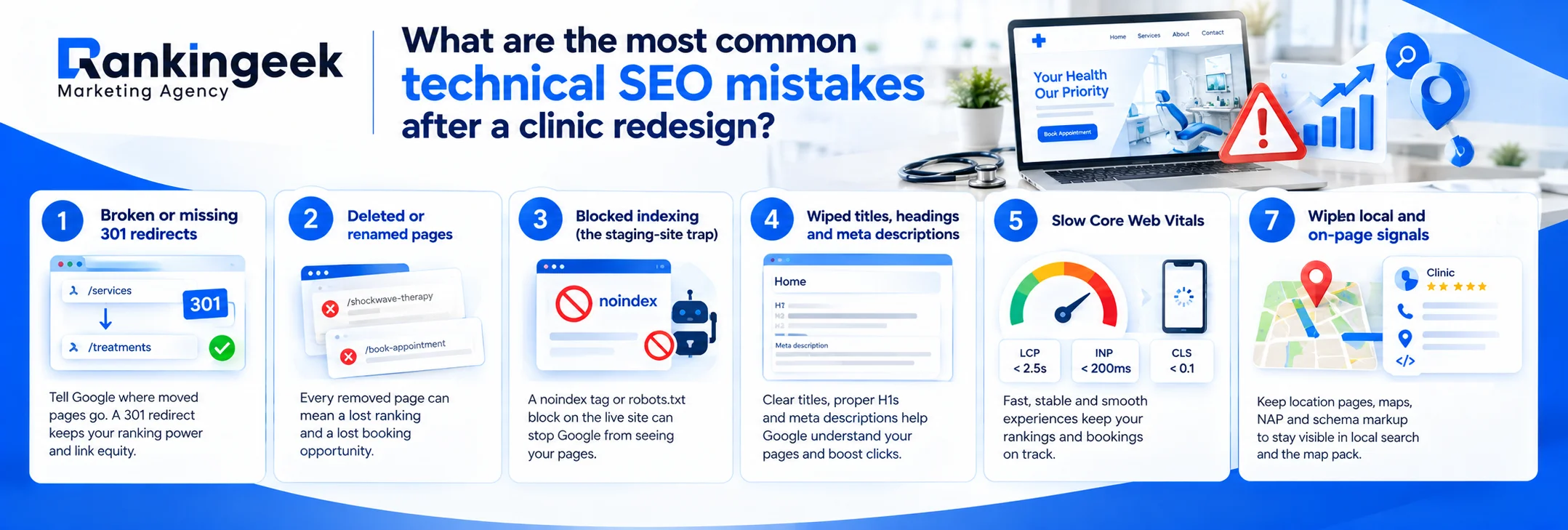
1. Broken or missing 301 redirects
This is the number-one cause. When a page moves from /services to /treatments and nothing tells Google, the old ranking URL simply returns a 404. Google recommends a permanent, server-side 301 redirect from every old URL to its closest new match, which carries the page's authority across (Google's guidance on redirects). Google also confirms that permanent redirects don't cause a loss of link credit (site moves with URL changes), so skipping this step throws away years of ranking equity for nothing.
2. Deleted or renamed pages
Redesigns love to “clean up” the menu. A physiotherapy clinic in Ontario might fold its individual /shockwave-therapy page into one long services page—erasing the exact URL that ranked for “shockwave therapy near me.” A dental practice might rebuild without its old /book-appointment page, breaking the single link patients clicked most. Every removed page is a removed ranking, and often a removed booking path.
3. Blocked indexing (the staging-site trap)
Developers build on a staging site that's deliberately hidden with a noindex tag or a robots.txt block. If that block ships to the live site, Google is told to ignore your pages entirely (Google's noindex documentation). It's one of the most common—and most damaging—launch-day mistakes, and it can wipe a clinic off search within a week.
4. Wiped titles, headings and meta descriptions
New templates often reset page titles to “Home,” stack multiple H1s, or strip meta descriptions. These on-page signals tell Google—and patients scanning the search results—what each page offers. Lose them and both relevance and click-throughs fall.
5. Slow Core Web Vitals
A media-heavy new design can crush your load times. Google measures real-world speed with Core Web Vitals: Largest Contentful Paint under 2.5 seconds, Interaction to Next Paint under 200 milliseconds, and Cumulative Layout Shift under 0.1 (Google web.dev, Core Web Vitals). Miss these on mobile—where most patients search—and both rankings and bookings suffer.
6. Broken internal links and orphaned pages
When menus and buttons are rebuilt, internal links often point to old URLs that no longer exist. Broken links waste crawl budget, frustrate patients, and leave important pages “orphaned” with no path for Google to find them.
7. Wiped local and on-page signals
Location pages, embedded maps, a consistent name-address-phone (NAP), and schema markup are easy to lose in a rebuild. For Canadian clinics that depend on local search and the Google map pack, that's a direct hit to visibility. (If your map listing has slipped, see why your clinic may not be showing in the Google map pack.)
Free Clinic SEO / Visibility Audit
Want a plain-English report on exactly what your redesign broke? Claim your free clinic visibility audit through our SEO services in Canada, and we'll show you the fastest wins first.
How do you recover lost SEO traffic after a new website?
Recovering lost SEO traffic after a new website is methodical, not magical. Work through the essentials below in order, then give Google time to recrawl. Google notes that some ranking fluctuation is normal after a big change, and that a fresh sitemap helps it re-discover your pages faster (Google: site moves with URL changes).
Once the emergency is handled, the goal is to make sure a future redesign never tanks your rankings again. That means building SEO into the process from day one—not bolting it on afterward. Technical SEO is one piece of broader healthcare marketing strategies for clinics, and a dependable practice growth infrastructure keeps your technical foundation, content and local signals healthy month after month. For a wider view of what a full programme covers, see our guide to healthcare SEO in Canada.
How long until rankings come back?
Expect recovery in stages, not overnight. Google has to recrawl and reindex your corrected pages, and it warns that rankings can fluctuate temporarily during any major change—often a few weeks for a mid-sized clinic site, and longer for larger ones (Google: site moves). Submitting a sitemap and keeping your redirects live for several months speeds things up. If weeks pass with no recovery, a deeper technical audit usually finds a missed redirect or a lingering noindex.
Patient trust shapes decisions long after someone finds you, so keep reviews healthy and manage your clinic's online reputation alongside your SEO. Rankings get patients to your door; reputation gets them to book.
Also read: Why Is My Clinic Not Showing in the Google Map Pack Anymore?
Frequently Asked Questions
Why did my clinic's traffic drop right after launching a new website?
Almost always because the redesign broke technical SEO signals—missing 301 redirects, deleted pages, or a leftover noindex tag. Google can no longer find or trust the pages that used to rank. Fixing the redirects and indexing usually starts the recovery.
Do 301 redirects really save my rankings?
Yes. A permanent 301 redirect points an old URL to its new home and carries most of the page's ranking authority. Google confirms permanent redirects don't cause a loss of link credit, so mapping every old URL is essential.
How long does it take to recover lost SEO traffic after a new website?
For most mid-sized clinic sites, a few weeks once the fixes are live and Google recrawls. Larger sites can take longer. Submitting a fresh sitemap in Google Search Console speeds up re-discovery.
Can a slow new design really hurt my Google rankings?
It can. Google uses Core Web Vitals—loading, responsiveness and visual stability—as ranking signals. A heavy new design that fails these on mobile can drag down rankings and cost you patient bookings.
How do I know if my redesign left a “noindex” tag on the site?
Check the Pages report in Google Search Console for “Excluded by ‘noindex’,” or view a page's source for a robots noindex meta tag. Removing it and requesting indexing is often a quick win.
Should I fix this myself or hire an SEO team?
Small clinics can handle basic redirect and indexing fixes with care. If traffic keeps falling or the site is large, a technical SEO team will find missed redirects and lingering blocks faster—and protect your future bookings.